

Fortnite Spending Tracker Revealed

Monitor Your Fortnite Spending: A Guide to Tracking Your V-Buck Expenses
Want to know exactly how much you've spent on Fortnite skins and V-Bucks? This guide outlines two methods to track your in-game expenditures, helping you stay on top of your spending habits. Remember, those seemingly small purchases can add up quickly!
Two Ways to Check Your Fortnite Spending
You can check your spending in two ways: directly through your Epic Games Store account or by utilizing a helpful third-party website. Knowing your spending prevents unexpected surprises when reviewing your bank statements.
Why Track Your Spending?
Tracking your spending is crucial. Small, frequent purchases can accumulate rapidly. A simple oversight can lead to significant unexpected expenses, similar to the case mentioned where a player unknowingly spent nearly $800 on Candy Crush in just three months.
Here's how to check your Fortnite spending:
Method 1: Review Your Epic Games Store Transactions
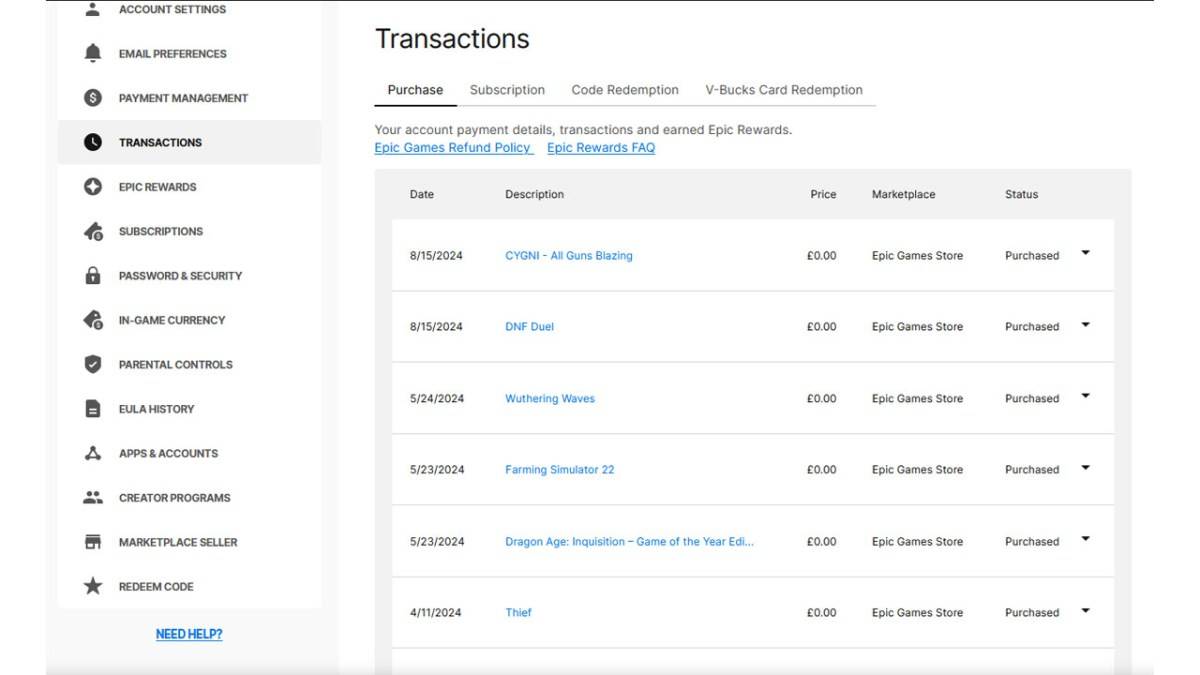
All V-Buck purchases are recorded in your Epic Games Store account, regardless of platform or payment method. Follow these steps:
- Visit the Epic Games Store website and log in.
- Click your username in the top right corner.
- Select "Account," then "Transactions."
- On the "Purchase" tab, scroll through your transaction history, clicking "Show More" as needed.
- Identify your V-Buck purchases (usually listed as "5,000 V-Bucks" with a corresponding dollar amount).
- Manually record the V-Buck and currency amounts for each purchase.
- Use a calculator to sum your total V-Buck and currency spending.
Important Considerations: Free games claimed through the Epic Games Store will also appear; scroll past these. V-Bucks card redemptions may not display a dollar amount.
Method 2: Using Fortnite.gg
As noted by Dot Esports, Fortnite.gg offers a way to track your spending, although it requires manual entry.
- Go to Fortnite.gg and log in or create an account.
- Navigate to "My Locker."
- Manually add each outfit and item from your cosmetics inventory by clicking on each item and selecting "+ Locker." You can search for items to speed up the process.
- Your locker will then display the total V-Buck value of your owned items. Use a V-Buck to dollar converter (easily found online) to determine your approximate spending.
While neither method is perfect, they provide reasonable estimates of your Fortnite spending.
Fortnite is playable on various platforms, including Meta Quest 2 and 3.
-
 AbozorAbozor – Ishonchli avtomobil aloqalari platformasi Abozor – Oʻzbekistondagi eng yirik avtomobil ecosystemasi! Bizning ilovamiz orqali quyidagi imkoniyatlardan foydalanishingiz mumkin: Avtomobil bozori Yangi va ishlatilgan avtomobillar uchun eng ya
 -
 Zombie KillerEscape the terrifying ghost house, play, and enjoy this horror zombie killer game!Zombie Killer is an action game that merges the classic shooter experience with timeless racing game thrills. From a frightening ghost house escape to confronting the e
 -
 Logica - Math Logic & IQ TestBoost and assess your IQ with the Math IQ Gaming & Training – Logic & IQ Test app.Logica – Math Logic IQ Test is an excellent tool for practicing and enhancing your intelligence through math-based logical puzzles.Though logic puzzles may appear as si
 -
 Super Slices Robux RoblominerEarn Robux as you slice! Soothing and satisfying vegetable chopping. Chop with professional chef skills and collect Robux! What's New in Version 0.87 Last updated on Jul 25, 2024
 -
 MAGER - Game Penghasil UangPlay and win real money prizes in this real money-making game!Enjoy playing games and earning real money rewards—completely free, with no deposit required!Start playing MaGer, the money-making and fund-generating game, and claim your free real money
 -
 Parental Control for FamiliesParental Control for Families provides comprehensive online protection for your children. This top-rated app gives parents powerful tools to create a safer digital environment with content filtering, screen time limits, real-time monitoring, and loc




